Teal Matte Glitter Digital Paper: A Practical Tool for Creative Projects and Business Workflows
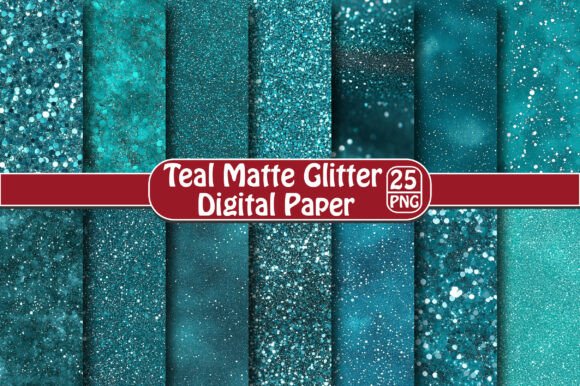
Teal Matte Glitter Digital Paper is a versatile digital asset that brings a touch of elegance and modernity to any design project. Whether you're a professional graphic designer, a small business owner, or a hobbyist working on personal crafts, this digital paper can enhance your creative output with its unique texture and aesthetic appeal. Designed as a set of 25 high-resolution PNG files (300 dpi, 12×12 inches), each file features a solid teal base with a distressed glitter effect and a transparent background, making it easy to integrate into various platforms and projects.
Understanding the Role of Teal Matte Glitter Digital Paper in Your Workflow
In the broader context of design and print workflows, digital papers like the Teal Matte Glitter variant serve as foundational elements. They provide a consistent visual backdrop that can be customized and layered with other design components. This makes them especially useful during the planning and execution phases of a project where maintaining a cohesive look across multiple outputs is essential.
For instance, when designing promotional materials such as T-shirts, stickers, or greeting cards, having a reliable digital paper ensures that your brand colors remain consistent while adding subtle sparkle and depth through the glitter effect. The matte finish prevents glare, while the glitter adds just the right amount of visual interest without overwhelming the design.
Before the Project: Planning and Preparation
Before diving into a creative project, it's important to assess what tools and assets will best support your goals. If your project involves printing physical items like wall decor, frame artwork, or scrapbook pages, selecting the right digital paper is crucial. Teal Matte Glitter Digital Paper fits well in scenarios where you want to add sophistication without sacrificing clarity or legibility.
- Define the purpose: Determine if the teal color and glitter effect align with your project’s theme or branding.
- Check compatibility: Ensure that the software you plan to use supports transparent PNGs and allows for resizing without loss of quality.
- Organize your digital library: Store the 25 designs in a dedicated folder for easy access and reuse in future projects.
During the Project: Integration and Application
Once you've selected Teal Matte Glitter Digital Paper as part of your toolkit, the next step is integrating it into your workflow. Its transparent background and high resolution make it ideal for layering over text, images, or other design elements. You can use it as a background for printed stickers, or incorporate it into card layouts to create a polished yet eye-catching finish.
Here’s how you can apply it effectively using common design software:
- Open your design tool: Use Adobe Photoshop, Canva, or even free tools like GIMP or Figma.
- Import the digital paper: Drag and drop the PNG file into your workspace. Because it has a transparent background, it won’t obscure underlying content unless you place it directly beneath other layers.
- Resize and adjust: Since the files are high-resolution, they can be scaled up or down without losing quality. Adjust dimensions to fit your specific canvas size or product requirements.
- Overlay with other design elements: Add text, illustrations, or photographs on top of the paper for a seamless composition.
After the Project: Printing and Quality Control
When you’re ready to move from digital to physical, the real test begins. While the digital file looks great on screen, it's important to consider how it translates to print. The Teal Matte Glitter Digital Paper is designed with printing in mind, but there are still factors to monitor:
- Printer compatibility: Confirm that your printer can accurately reproduce the matte and glitter effects. Some printers may not capture the shimmer exactly as seen on-screen.
- Material choice: For maximum visual impact, choose high-quality matte stock when printing physical products. This will better reflect the intended appearance of the digital paper.
- Color calibration: Colors may appear slightly different depending on the device used to view them. Always perform a test print to ensure the teal hue matches your expectations.
It's also worth noting that because this is a digital instant download, you'll receive all 25 designs immediately after purchase. No waiting for shipping means you can start incorporating them into your work right away, which is particularly helpful when tight deadlines are involved.
Use Cases Across Industries and Hobbies
Teal Matte Glitter Digital Paper isn't limited to a single niche—it can be applied in a wide range of contexts. Here are some practical examples:
Marketing and Branding
Entrepreneurs and marketers often need to produce branded materials quickly and consistently. Using this digital paper can help maintain a professional look across brochures, packaging, and promotional signage. The distressed glitter effect adds a subtle edge that appeals to both traditional and modern audiences.
Education and Presentations
Educators and presenters can use these digital papers as backgrounds for educational posters, flashcards, or interactive displays. The teal color offers a calm and focused tone, while the glitter adds a level of engagement—especially useful when targeting younger audiences or creating visually stimulating learning environments.
Crafting and Scrapbooking
For hobbyists and crafters, the versatility of Teal Matte Glitter Digital Paper is invaluable. It can be printed onto cardstock and used in scrapbooks, journal covers, or handmade greeting cards. The distressed effect gives it a weathered, artistic feel, perfect for vintage-inspired or minimalist layouts.
Wall Art and Decor
Designers and interior decorators can utilize this digital paper for custom wall art, framed prints, or accent pieces. Its soft teal shade complements many color schemes, and the glitter effect introduces a dynamic visual element that catches light beautifully in physical form.
Workflow Examples and Tips
Let’s explore a few workflow scenarios where Teal Matte Glitter Digital Paper can be implemented smoothly:
Scenario 1: Designing a Line of Stickers
You’re launching a new sticker collection for a boutique clothing line. To keep the designs aligned with the brand’s aesthetic, you decide to use a teal base with a bit of sparkle.
- Download and organize the 25 digital paper designs into your design resource folder.
- Create a new document in your preferred design software with the appropriate dimensions for your sticker templates.
- Select a Teal Matte Glitter design that complements your logo or graphics.
- Place the digital paper at the bottom of your design stack and build your sticker elements on top.
- Export the final design in a format compatible with your sticker printer or vendor.
Scenario 2: Creating a Custom Card Set for a Wedding
A client wants a set of thank-you cards with a modern yet elegant look. The distressed glitter effect of the Teal Matte Glitter Digital Paper adds a refined texture that pairs well with floral or script fonts.
- Choose a digital paper that reflects the wedding’s color palette and overall vibe.
- Use the transparent background to overlay the paper with watercolor textures or hand-drawn elements.
- Print the cards on thick matte paper to preserve the visual integrity of the design.
- Test the print before bulk production to ensure the glitter doesn’t appear too dark or flat.
Long-Term Use and Organization
One of the key benefits of purchasing a set of 25 designs is the ability to reuse them across multiple projects. However, managing such a large number of files requires organization. Consider naming conventions based on pattern type or intensity (e.g., "teal_glitter_light_01", "teal_glitter_heavy_07") so you can quickly find the right design for each task.
Additionally, back up your files in cloud storage or an external drive to prevent accidental loss. Keeping these digital papers accessible ensures you can leverage their value long after the initial purchase.
Efficiency and Consistency in Design Processes
Consistency is vital in any design process, whether you're producing marketing collateral or personal art. By using a standardized set of digital papers like Teal Matte Glitter, you eliminate guesswork and reduce the time spent sourcing new textures or patterns. This leads to more efficient workflows and a more unified end result.
Moreover, since the files are already optimized for 300 dpi and come in a standard 12×12 inch format, they require minimal adjustment before being used. This streamlines your editing process and helps maintain professionalism throughout your project lifecycle.
Final Thoughts on Implementation
Teal Matte Glitter Digital Paper is more than just a decorative element—it's a functional tool that enhances both digital and physical outputs. Its high resolution, transparent background, and distressed glitter effect allow for flexibility and creativity across industries and hobbies alike.
By understanding how it fits into your existing workflows and using it strategically, you can elevate your projects without unnecessary complexity. Remember to always preview your designs before printing and select the right material to ensure the final product meets your standards.
Whether you're looking to streamline your creative process or add a unique visual component to your next design, this digital paper is a valuable addition to your resource kit. Its ease of use, adaptability, and professional finish make it suitable for both quick turnaround tasks and long-term creative ventures.