Watercolor Tulip Flowers Digital Paper: A Versatile Resource for Creative Projects
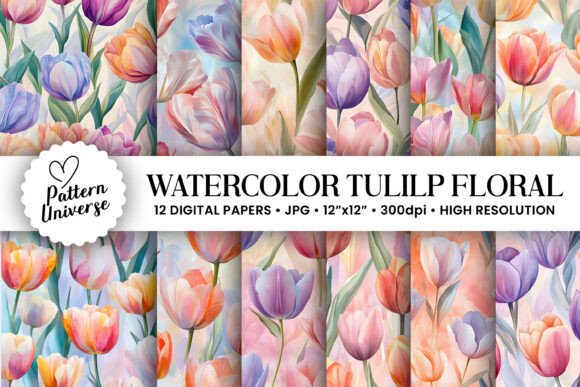
Watercolor Tulip Flowers Digital Paper is a digital design asset that brings the soft, elegant beauty of hand-painted tulips into your creative toolkit. Ideal for both beginners and seasoned designers, these high-resolution digital papers are crafted to look like traditional watercolor art but offer the convenience and flexibility of digital formats. Whether you're working on gift wrapping, greeting cards, invitations, tumbler wraps, junk journal backgrounds, wall art, or scrapbooking projects, Watercolor Tulip Flowers Digital Paper can elevate your designs with a touch of sophistication and charm.
Common Misconceptions About Digital Papers
One of the most frequent misunderstandings is thinking that digital paper is only for tech-savvy users. In reality, it’s accessible to anyone who enjoys crafting or designing. You don’t need advanced graphic design skills to use it — just basic knowledge of image editing software or online tools like Canva, Adobe Photoshop, or even PowerPoint will do. The key is understanding how to properly apply the pattern and scale it without losing quality.
Mistake 1: Ignoring File Resolution and Size
Many users overlook the importance of file resolution when selecting digital paper. For print-based crafts such as greeting cards or wall art, using low-resolution images can lead to blurry or pixelated results. The Watercolor Tulip Flowers Digital Paper set includes all files at 300dpi, which is ideal for printing. Additionally, each file measures 3600 x 3600 pixels (or 12” x 12”), ensuring compatibility with most standard-sized craft projects.
Better approach: Always check the resolution and dimensions before downloading any digital paper. If you’re unsure whether a project requires high-res files, err on the side of caution and choose those with 300dpi and larger pixel counts. This ensures your final product looks professional and crisp, no matter the medium.
Mistake 2: Not Previewing the Pattern Before Purchase
Digital papers often come in repeating patterns, and what looks great on a small thumbnail might not work well when tiled across a larger surface. Some people buy digital paper without checking how it scales or repeats, leading to disappointment when the full layout doesn’t match their vision.
Pro tip: When purchasing digital paper, look for previews that show the pattern repeated across a larger area. With Watercolor Tulip Flowers Digital Paper, the seamless nature of the design has been carefully considered so that it blends smoothly when tiled, making it perfect for backgrounds and large prints.
Mistake 3: Using the Wrong File Format
Digital papers typically come in common image formats like PNG or JPEG. However, some creators mistakenly assume that all formats are interchangeable without considering the impact on quality or ease of use. PNG files, for example, are excellent for preserving transparency and sharp lines, while JPEGs may be more suitable for photo-realistic textures.
When you download the Watercolor Tulip Flowers Digital Paper, you’ll receive optimized files ready for immediate use in your favorite design programs. Be sure to confirm the format suits your intended application — especially if you plan to layer the paper with other elements or add text over it.
Practical Applications and Use Cases
The versatility of Watercolor Tulip Flowers Digital Paper makes it a valuable addition to any creative library. Here are some of the top ways it can be used:
- Gift Wrapping: Add a personal touch to presents by using the digital paper as a printable wrap or label background.
- Greeting Cards: Create custom cards for birthdays, weddings, or holidays with a soft floral aesthetic.
- Invitations: Design elegant invites that stand out with a natural, artistic feel.
- Tumbler Wraps: Transform plain drink tumblers into personalized keepsakes with vibrant, durable prints.
- Junk Journal Backgrounds: These papers provide a beautiful base for mixed-media journals and planners.
- Wall Art: Print and frame the digital paper for an instant decorative accent in your home or office.
- Scrapbook Pages: Use the paper as a background to unify photos and embellishments in your scrapbooking layouts.
Each of these uses benefits from the high-quality design of the Watercolor Tulip Flowers collection. Its subtle tones and painterly texture allow it to complement a wide range of color schemes and themes without overwhelming them.
Mistake 4: Overlooking Compatibility with Your Tools
A lesser-known issue is assuming that any digital paper will work seamlessly with your design software. While most modern platforms support common image formats, there can be differences in how they handle scaling, transparency, and layers. It's always wise to test the digital paper in your chosen tool before finalizing a project.
How to avoid this: Download a sample or preview version if available, and open it in your preferred design app. Check for clarity, alignment, and how it interacts with other elements. With Watercolor Tulip Flowers Digital Paper, compatibility has been tested across major platforms to ensure smooth integration.
What to Look for When Evaluating Digital Papers
Before committing to a purchase, consider the following factors to ensure you get the best value and usability from your digital paper:
- Resolution: Confirm the file is at least 300dpi for print-ready quality.
- Dimensions: Choose a size that matches your typical project needs (e.g., 12" x 12" for scrapbooking).
- Pattern Repeats: Ensure the pattern tiles well without visible seams or distortions.
- File Format: Select a format that works with your design tools and supports your intended output (print or digital).
- License Type: Understand whether the paper is for personal or commercial use. Many AI-generated digital papers include clear usage rights in their descriptions.
With Watercolor Tulip Flowers Digital Paper, you get 12 unique designs packed into one zip file. Each is crafted for seamless tiling and comes in a professional-grade resolution, saving you time and effort in sourcing multiple compatible assets.
Mistake 5: Rushing the Download Process
After making a purchase, some users rush through the download process without verifying the contents. This can lead to missing files, incorrect versions, or issues with unzipping. Especially with bundles like the Watercolor Tulip Flowers Digital Paper, it's important to make sure all 12 designs are included and accessible after extraction.
Corrective action: After downloading the zip file, take a moment to open it and review the contents. Ensure the folder structure is clear and the file names are descriptive. If something seems off, contact the seller immediately for support. Most reputable sellers provide easy access to updates or replacements if needed.
Enhancing Your Workflow with AI-Generated Designs
AI-generated digital papers, like the Watercolor Tulip Flowers collection, are designed to mimic the look of hand-painted artwork. They save time and offer consistency, making them ideal for creators who want a cohesive style across multiple projects. Unlike generic stock patterns, AI-generated designs often feature original compositions tailored to specific aesthetics.
However, it's crucial to understand the limitations. AI-generated art should not be mistaken for real human illustrations. While it offers incredible efficiency and variety, the level of detail and uniqueness may vary. Always evaluate the design for authenticity and suitability to your brand or project.
Real-World Example: Greeting Card Business
Imagine running a small business selling handmade greeting cards. You decide to use Watercolor Tulip Flowers Digital Paper as your background for a spring-themed line. But instead of testing the paper first, you print a batch directly from the downloaded file. Upon inspection, you notice the colors appear washed out because the printer profile wasn't calibrated correctly for the digital paper’s hues.
This could have been avoided by printing a test swatch before producing the full run. It also highlights the importance of knowing your printing setup and adjusting settings accordingly. By taking these extra steps, you maintain the integrity of the design and the satisfaction of your customers.
Mistake 6: Underestimating the Value of Organization
Once you’ve downloaded the Watercolor Tulip Flowers Digital Paper, it's easy to let the files accumulate in a disorganized folder. This can lead to confusion when trying to find the right pattern quickly. Worse still, it may cause accidental reuse of the same design, resulting in a repetitive look across different projects.
Solution: Create a dedicated folder for your digital papers and name the files clearly based on their content or intended use. For instance, you could label them “Tulip Paper – Soft Pink,” “Tulip Paper – Spring Green,” etc. This helps streamline your workflow and ensures you always have the perfect design on hand.
Why Watercolor Tulip Flowers Digital Paper Stands Out
Among the many digital paper collections available today, Watercolor Tulip Flowers stands out due to its attention to detail and thoughtful curation. The 12 designs in this bundle are varied enough to suit different tastes yet cohesive in style, allowing for easy mixing and matching in multi-page projects or themed collections.
Its AI-generated origin means the patterns are consistent in quality and scalable in quantity. You won’t face the shortage of unique options that can happen with hand-drawn designs. Plus, since it's digital, you can edit colors, overlay textures, or combine it with other digital assets to create truly personalized results.
Mistake 7: Skipping the Tutorial or Help Resources
If you're new to using digital papers, it’s tempting to skip tutorials and jump straight into creating. This can lead to inefficient workflows or missed opportunities to enhance your designs. Understanding how to adjust opacity, blend modes, and layer styles can unlock new levels of creativity.
Recommended step: Take a few minutes to explore short online tutorials or help guides related to your design software. Learning how to manipulate digital papers can significantly improve the outcome of your projects. Many digital paper sellers also include brief usage tips or FAQs — read them carefully!
Final Thoughts on Choosing the Right Digital Paper
Watercolor Tulip Flowers Digital Paper is more than just a pretty background — it’s a versatile resource that can inspire creativity and streamline your design process. But like any tool, it requires mindful selection and proper application to achieve the best results.
By avoiding common pitfalls like ignoring resolution, skipping pattern previews, or neglecting organizational habits, you’ll maximize the value of your purchase. Remember, the goal isn’t just to find a nice-looking design; it’s to invest in a tool that supports your workflow and enhances your final product.
So next time you’re planning a craft project or designing for clients, think about how Watercolor Tulip Flowers Digital Paper could bring a fresh, artistic flair to your work. With 12 high-resolution, AI-generated designs in one convenient zip file, it’s a smart choice for anyone serious about their creative pursuits.