190 Digital Paper Textures for Creative Projects
If you're a designer, digital artist, or someone who loves adding personality to their creative work, you know that the right textures can make all the difference. 190 Digital Paper Textures is more than just a collection of background files—it's a toolkit for bringing your designs to life with depth, character, and visual intrigue. These high-resolution textures are perfect for anyone looking to elevate their scrapbooking, branding materials, product packaging, or digital artwork with something that feels authentic and professional.
What Makes 190 Digital Paper Textures Stand Out?
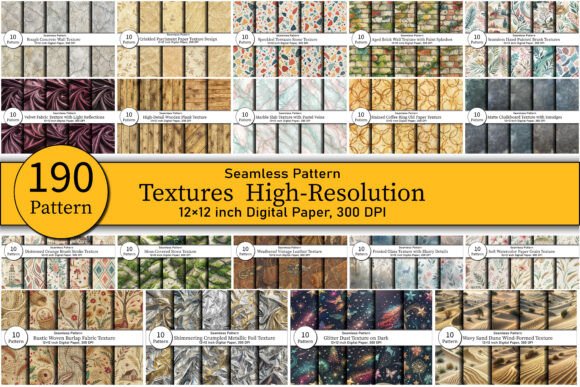
The appeal of this texture pack lies in its variety and quality. With 190 JPG files at 300 DPI and 3600 x 3600 pixels, each texture is built for both print and digital use without compromising clarity. The seamless nature of these textures means they can be tiled across large surfaces without visible breaks, making them ideal for backgrounds, overlays, and design elements where consistency is key.
From rustic burlap and aged leather to luxury metallic foils and soft watercolor papers, the collection offers a broad spectrum of styles. Whether you're aiming for a vintage aesthetic or a sleek modern look, there's a texture here that fits the bill. The attention to detail in each file—from subtle grain patterns in marble to the roughness of hand-painted canvas—ensures your projects feel polished and intentional.
Where Can You Use These Textures?
190 Digital Paper Textures is incredibly versatile. Here are some common use cases:
- Scrapbooking & Journaling: Add dimension to layouts with layered textures like parchment or linen.
- Invitation Design: Create elegant, eye-catching invites using velvet or frosted glass effects.
- Product Packaging: Bring out the tactile qualities of your brand through printed textures on labels or boxes.
- Web & Social Media Graphics: Use low-opacity overlays to give flat designs a sense of realism and sophistication.
- Editorial Design: Enhance magazine spreads, book covers, or blog headers with subtle paper or stone finishes.
- Digital Artwork: Incorporate grunge or artistic brush textures into illustrations for added visual interest.
These textures aren’t limited to one industry or project type. Entrepreneurs might use them for branding assets, while marketers could integrate them into campaign visuals. Bloggers and publishers can apply them to enhance the look of printable worksheets or zines. The possibilities are endless when you consider how much impact texture can have on user experience and design perception.
Designers Love Seamless Integration
One of the standout features of 190 Digital Paper Textures is how easily they integrate into popular design tools like Photoshop and Canva. Because they’re provided in a standard format (JPG), they don't require special plugins or software to work with. This makes them accessible to both professionals and hobbyists alike.
For example, when creating a minimalist logo, you might pair a clean sans serif font with a soft watercolor paper texture as a background. It adds warmth without overwhelming the typography. Similarly, a blogger designing a printable worksheet could layer a subtle stone texture beneath the text to give it a grounded, earthy feel.
How Texture Impacts Brand Perception and Readability
Texture isn't just about aesthetics—it also plays a crucial role in how people perceive and interact with your content. A well-chosen texture can subtly influence readability by guiding the viewer’s eye and setting a tone. In editorial design, for instance, a distressed parchment texture can evoke nostalgia and encourage closer reading, especially if the content aligns with history or storytelling.
In terms of brand identity, textures help reinforce the visual language of your brand. If you're working on a luxury skincare line, using a foil or shimmer texture in your packaging design can communicate opulence and quality. Conversely, a natural wellness brand might opt for moss-covered wood or sand dune textures to emphasize authenticity and connection to the earth.
When used thoughtfully, these textures support visual hierarchy. They can highlight important sections, add contrast between layers, or serve as a backdrop that complements rather than competes with other design elements. For example, placing a bold display font over a textured background can create a striking focal point that enhances audience engagement and reinforces professionalism.
Choosing the Right Texture for Your Project
Not every texture works for every design. Consider the purpose of your project and the message you want to convey. A wedding invitation with a heavy grunge texture might clash with the romantic, refined tone you're going for. On the other hand, a vintage-style poster would benefit greatly from an old parchment or cracked paint surface.
Here’s a quick guide to selecting the best texture for your needs:
- Evaluate the mood: Does your project need to feel warm, luxurious, rugged, or clean? Choose a texture that matches the desired emotion.
- Test with fonts: Pair different textures with your chosen typeface. See how they affect legibility and overall balance.
- Consider context: Will the texture be used in print or digital media? Some textures translate better in physical form, while others are ideal for web-based graphics.
- Review included styles: The collection includes everything from natural elements like marble and frosted glass to man-made textures like terrazzo and hand-painted brushes. Take time to explore what's available.
- Check licensing: Make sure the texture pack allows commercial use if your project will be monetized or distributed publicly.
Practical Tips for Using These Textures
To get the most out of 190 Digital Paper Textures, experiment with blending modes in your design software. Overlay or Soft Light settings often yield beautiful results, especially when combining textures with photographs or illustrations. You can also adjust opacity to keep the texture subtle and avoid overpowering the main content.
Another tip is to limit yourself to one or two dominant textures per project. Overloading a design with too many textures can lead to visual clutter and reduce readability. Stick to what serves the purpose—whether it's a single background texture or a layered effect with contrasting materials.
Real-World Applications and Examples
Let’s say you're a small business owner launching a new line of handmade candles. You want your product packaging to reflect craftsmanship and elegance. By applying a luxury shimmer texture to your label design, you instantly elevate the perceived value of your product. Combine it with a serif font for a classic, sophisticated look, and you've created a cohesive brand identity that resonates with customers.
Or imagine you're a social media manager tasked with redesigning a brand’s Instagram template. A nature-inspired texture like wavy sand dunes could set a calming, organic vibe that aligns with the brand’s eco-friendly mission. Pair it with a modern sans serif font to maintain clarity and ensure your call-to-action remains easy to read.
For digital artists working on a personal portfolio site, using a grunge distressed texture behind a script font can give the layout a raw, edgy feel that stands out. Just remember to test how the texture affects color contrast and legibility before finalizing your design.
Why Designers Prefer This Collection
There are plenty of free texture packs online, but 190 Digital Paper Textures sets itself apart with premium quality and no watermark. That means you can confidently use these in commercial projects without worrying about unwanted branding or resolution issues. The 300 DPI specification ensures crisp printing, whether you're working on posters, brochures, or greeting cards.
Moreover, the range of styles supports creative experimentation. You can mix and match textures across different parts of a design—like using a wood texture for headers and a marble texture for body sections—to create a dynamic yet cohesive look. This kind of flexibility is rare in texture collections and invaluable for those who want to maintain design consistency across multiple platforms.
Final Thoughts on Creative Use
Textures are a powerful tool in the designer’s arsenal. They add depth, suggest materiality, and help tell a story without words. 190 Digital Paper Textures gives you everything you need to explore that potential with confidence. Whether you're enhancing a logo, crafting a unique website header, or designing printable art for your blog, these textures provide a foundation for creativity that’s both practical and inspiring.
As you work through your next project, think beyond flat colors and simple gradients. Ask yourself: How can texture bring my vision to life? What kind of tactile feeling do I want to evoke? And how does it support the rest of my design assets? These questions will help you choose the right textures and ensure your work leaves a lasting impression.